How to Connect Bithumb with a Read-Only API 2.0 Key (2026 Guide)
Guides · · Satoshi Note
Read in: 한국어
Bithumb is Korea's second-largest exchange, and many Korean investors hold coins on both Bithumb and Upbit. To see both balances on one screen you need a Bithumb API 2.0 key in your portfolio tracker. This guide walks through issuing one and adding it to Satoshi Note. About five minutes, no cost.
The key you create here is a read-only key with only Asset inquiry and Order inquiry enabled. Withdrawal and order permissions stay off, so it cannot sell or move your coins. The longer explanation is in What is a read-only API key?.
Three things to know before you start
- New keys can only be issued from the PC website. The Bithumb app cannot create keys. Sign in at bithumb.com in a desktop browser.
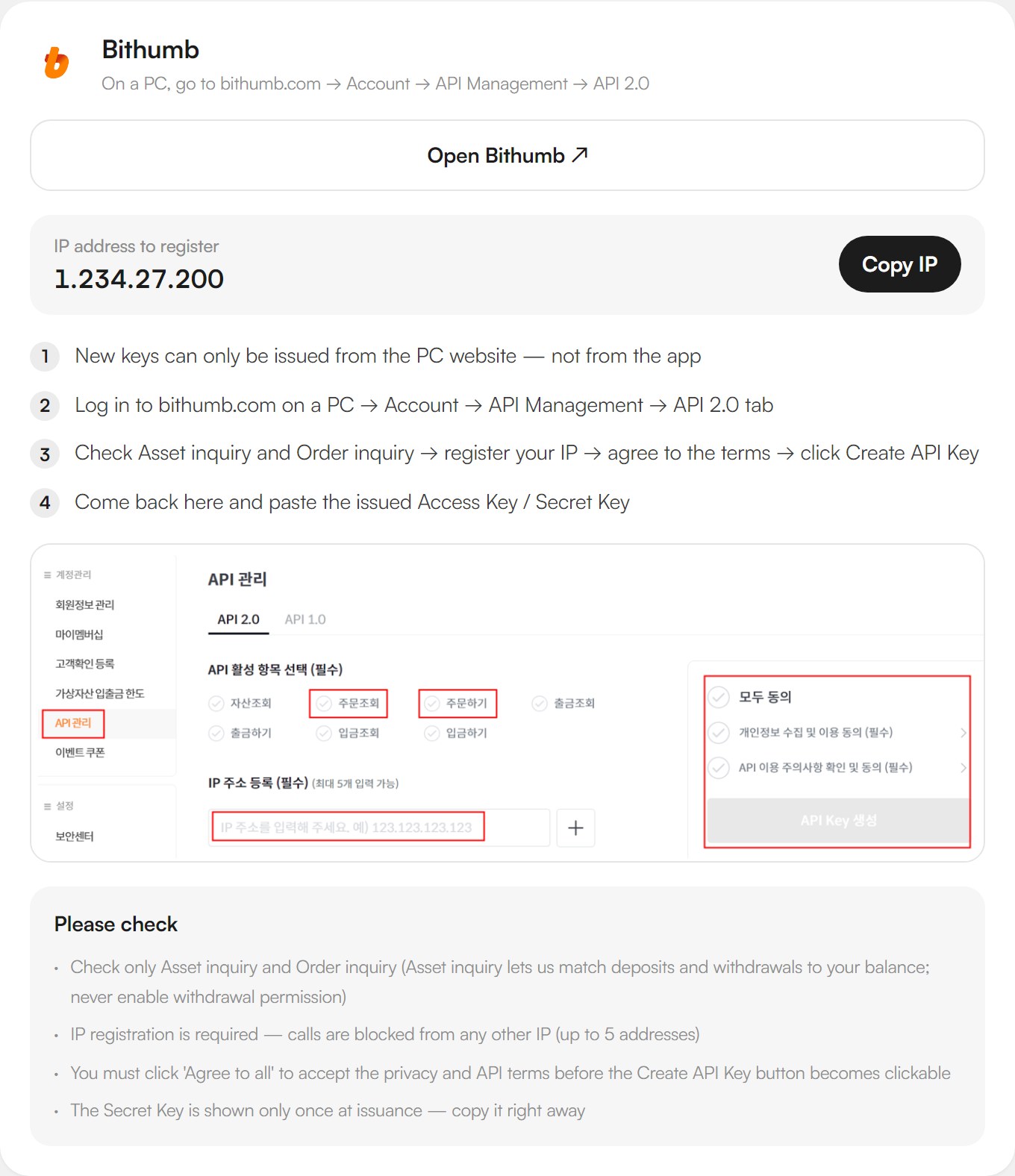
- IP registration is required. Requests from any other IP are rejected, and you can register up to five addresses. The address to enter is not your own PC. It is the Satoshi Note server, which queries Bithumb on your behalf. It is printed on the in-app connection guide next to a "Copy IP" button.
- The Secret Key is shown only once. Copy it the moment it appears.
Step 1 — Account → API Management → API 2.0
Sign in at bithumb.com on a PC and go to Account → API Management, then select the API 2.0 tab. It must be 2.0, not the legacy 1.0 tab, to work with Satoshi Note. The screenshot below is the Bithumb section of Satoshi Note's in-app guide: the four-step path, the IP to register, and the points to check.
Step 2 — Tick only Asset inquiry and Order inquiry
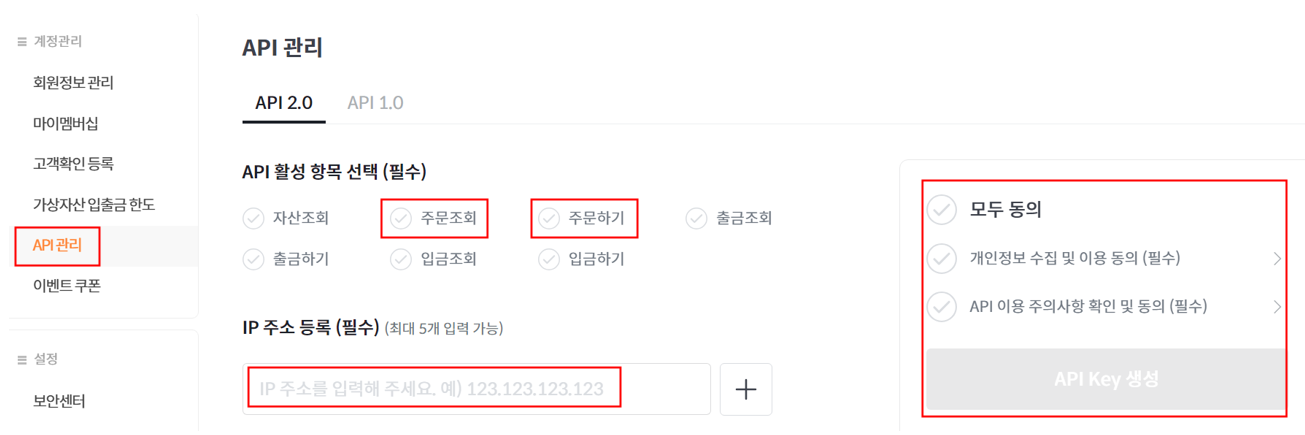
The API 2.0 issue screen lists several permission checkboxes.
- Tick Asset inquiry and Order inquiry only.
- Leave Place orders, Withdraw and Deposit unticked.
- Asset inquiry is what lets the tracker reconcile your current balance including coins that arrived or left by transfer. Order inquiry returns your fills. Those two are all a portfolio tracker needs for average cost and P&L.
Step 3 — Register the IP, agree to all, create
- Paste the address you copied with "Copy IP" into the IP address field. One address is enough.
- Click Agree to all to accept the privacy and API terms. The Create API Key button stays disabled until you do.
- Click Create. Bithumb shows an Access Key and a Secret Key. Copy both now.
Step 4 — Paste the keys into Satoshi Note
Sign in to Satoshi Note, open Settings → Connect exchanges, switch to the Korea tab and pick Bithumb. Paste the Access Key and Secret Key. Within a few seconds the app verifies the account, pulls recent fills and builds your records. Your Bithumb holdings appear with quantity, average cost and unrealized P&L next to any other exchange you have connected. Keys are stored encrypted on the server and used only to query Bithumb.
Once connected, you can also receive the same numbers as a daily email report.
Common snags
The Create API Key button is greyed out. Usually "Agree to all" has not been clicked. An empty IP field can also keep it disabled.
The key fails at the "verifying account" step. Most often the registered IP is missing or different. Check the key's IP in Bithumb's API Management against the one on Satoshi Note's guide. A key created under the API 1.0 tab will also fail. Create it under 2.0.
Do Bithumb and Upbit balances merge? Yes. For the same coin you see per-exchange quantity and average cost, and the portfolio total combines them.
What about deposits and withdrawals? Satoshi Note imports Bithumb spot fills and balances. Coins transferred in from elsewhere show up in the balance but have no fill history, so that quantity is recorded as a deposit.
Using other exchanges too?
We have the same walkthrough for Upbit and Binance. The in-app exchange connection guide covers all 13 supported exchanges with screenshots, including Coinone, Korbit and Gopax.
Satoshi Note is free. Read-only API keys only. The site is satoshinote.io.