What Is a Read-Only API Key? The Safe Way to Connect an Exchange
Guides · · Satoshi Note
Read in: 한국어
When a portfolio app asks for your exchange API key, hesitation is the right first reaction. The question we hear most is "if I paste that in, can someone drain my account?" The short answer: not if the key has the right permissions. This post explains exactly what those permissions are and how to check them, using real exchange screens.
API keys come with permission checkboxes
When you create an API key on an exchange, you tick permissions one by one. The names vary a little between exchanges, but they fall into three groups:
- Asset inquiry / Order inquiry (often "Enable Reading") lets the key see balances and fills.
- Trading lets the key place buy and sell orders.
- Withdrawals lets the key send coins to another address.
A portfolio tracker only needs to read your balances and fills and show them to you. So the key you give it should have inquiry permissions on and trading and withdrawal permissions off. If that key ever leaked, the only thing it could do is look. There is no way to sell or move coins with it.
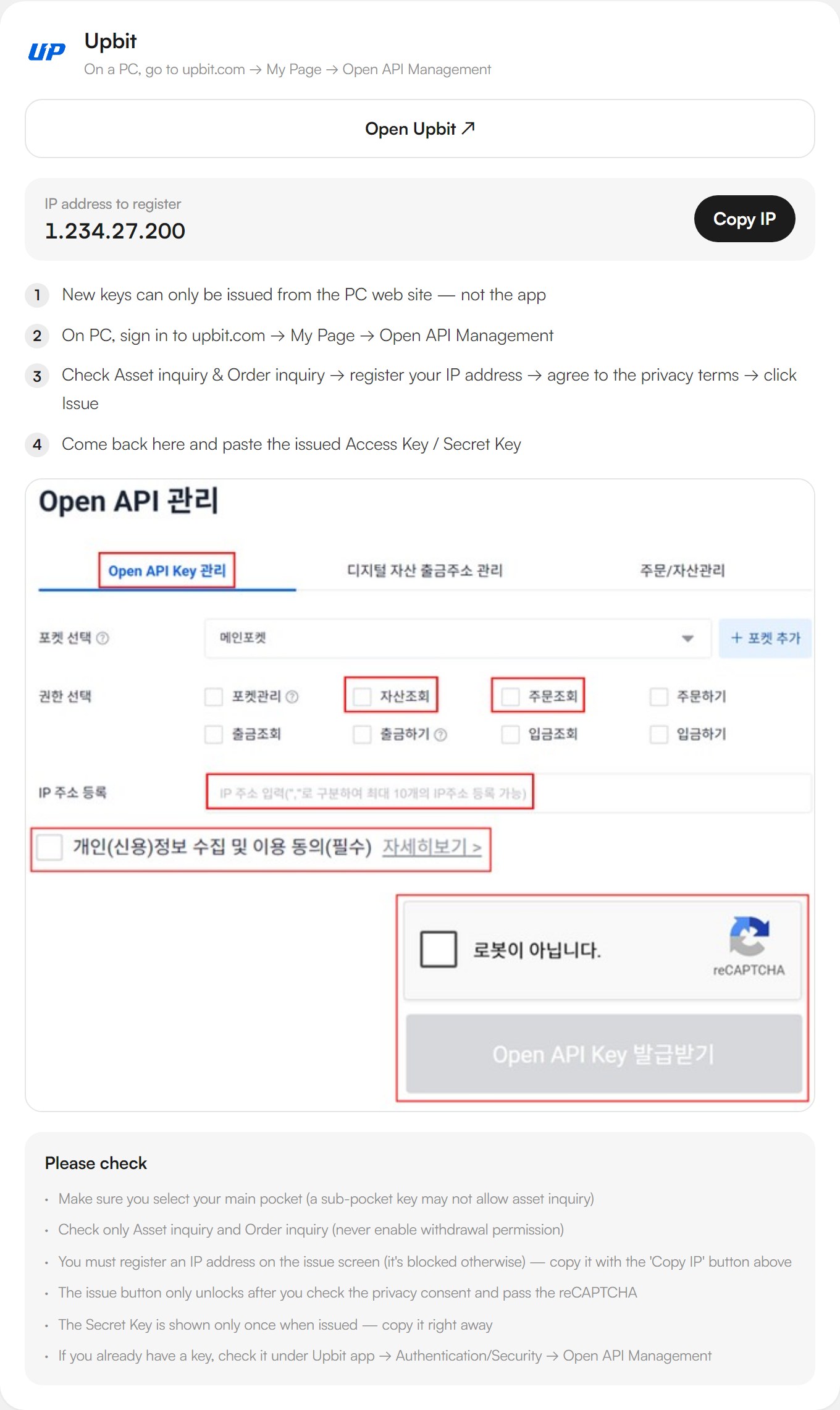
Below is the connection guide inside Satoshi Note. Pick an exchange and it shows the steps to create a read-only key on that exchange, including the IP address to register where the exchange requires one.
On a real screen: Upbit's Open API permissions
Words only go so far, so here is the permission screen you actually see when creating a key on Upbit, Korea's largest exchange.
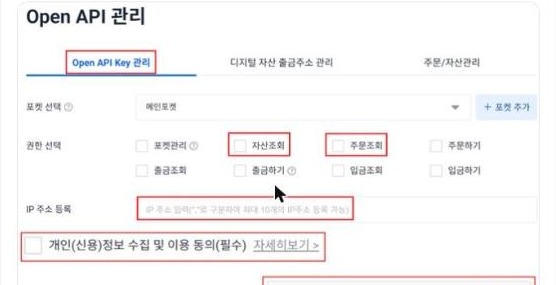
Only Asset inquiry and Order inquiry are ticked, outlined in red. Withdrawal and Deposit are left unticked. A key issued in this state can check balances and read trade history and nothing more. Taking coins out or placing orders is impossible with it. The same principle applies to every one of the 13 exchanges Satoshi Note connects to. On Binance it is the single "Enable Reading" box, on Coinbase it is the "View" scopes, on OKX and Bybit it is "Read" or "Read-Only".
Two extras that make it safer still
Read-only permissions are already enough, but where the exchange supports them, these two steps add another layer.
- Register an allowed IP. Many exchanges let you bind a key to the IP addresses that may use it. Upbit, Bithumb and Coinone require it. With an allowlist in place, the key is rejected from anywhere else, so a leaked key is useless even for reading.
- Delete keys you no longer use. If you stop using an app, delete its key on the exchange. That instantly cuts off access, and you do not need to change your password.
Frequently asked questions
Can a read-only key really do nothing else? Yes. The exchange's servers reject any request outside the key's permissions. It is not that the app chooses not to trade. The exchange makes it impossible. That means you do not have to decide how far to trust the app.
Do I also need to enter my password? No. An API key and your login password are completely different things. A read-only connection never asks for your exchange password or two-factor code anywhere.
How quickly does it show up? Within seconds. Once the key is in, Satoshi Note pulls balances and fills and computes average cost and P&L per asset.
What about hardware or self-custody wallets? Those do not use API keys at all. You add a public address and the app reads the chain. A public address cannot be used to move funds either.
Exchange-by-exchange walkthroughs
This post covers the "why" once. Where exactly to click on each exchange is covered in separate posts, starting with Upbit, Binance and Bithumb. If you want to try it right now, open the Satoshi Note connection guide, pick your exchange, and follow the screenshots.
Satoshi Note is free. Read-only API keys only. The site is satoshinote.io.